Manifest File
Please refer to the last section of this page to leverage the auto-completion of your manifest file on your IDE.
Below is the list of fields available to build the manifest file
-
kindvalid value is AIchorManifest; -
apiVersionvalid value is 0.2.3 which is the current version. -
builderdocker image, dockerfile and context are specified in this section;skipBuild(optional, default: false) determines whether to reuse an image previously built for another experiment;enabled: to use this feature this must be set to true (by default it is false), if unset or set to false this block will be ignoredexperimentID: the ID of the experiment whose image we want to reusefailIfNotFound: this toggle is to default to rebuilding the image if the aforementioned image was not found in the registry (by default set to false), if set to true the experiment will fail upon not being able to find the image mentioned
kind: AIchorManifest
apiVersion: 0.2.3

builder:
  image: myimage
  dockerfile: ./Dockerfile
  context: .
  skipBuild: # optional, disabled by default
    enabled: true
    experimentID: aaaaaaaa-bbbb-cccc-dddd-eeeeeeeeeee
    failIfNotFound: false
  ...
clone(optional) controls how the git repository is cloned during experiment execution;includeDotGit(optional, default: false) determines whether to keep the.gitfolder in the cloned repository;true: preserves the.gitfolder, allowing access to git history and informationfalse: removes the.gitfolder after cloning (default behavior for cleaner containers)
submodules(optional, default: "false") controls git submodule initialization;"false": no submodule initialization (default)"true": initialize submodules non-recursively"recursive": initialize submodules recursively
depth(optional, default: 1) controls how much Git history is fetched during cloning;1: shallow clone, fetches only the latest commit (fastest).n: fetches the lastncommits from the repository history.
kind: AIchorManifest
apiVersion: 0.2.3

clone: # optional
  includeDotGit: true
  submodules: "recursive"
  depth: 10  # optional, default: 1
Note: Submodules are only processed when includeDotGit is set to true.
spec:-
operatorvalid values so far are: jax, xgboost, pytorch, kuberay and jobset; -
imagedocker image used; -
commandcommand or script to be executed; -
engineName(optional) the name of the engine to run the experiment on. When omitted, the experiment runs on the project's default engine. Use this field to target a specific engine in a multi-engine setup.spec:
operator: jobset
image: myimage
command: "python3 -u main.py"
engineName: "kyber" # optional, targets a specific engine -
tensorboard(optional for all operators);enabledvalid values are true or false;usePVC(optional) use an existing PVC for TensorBoard logs instead of the default bucket/S3 storage;enabledvalid values are true or false. When enabled, the manifest must contain astorage.attachExistingPVCssection with at least one PVC;name(optional) the name of a specific PVC from thestorage.attachExistingPVCslist to use for TensorBoard. If not specified, the first PVC in the list will be used;
-
storageinside this you can define two types of storage:- Persistent: mount already existing PVC(s) to all pods of the experiment;
- Ephemeral: AIchor will create a shared volume, mount it to all pods of the experiment and it will then delete it at the end of the experiment;
- NOTE: you need to insert your shared volume configuration under the
storagekey. storageClasswill define the storageclass for the shared pvc (e.g. gp2/standard-rwo/ceph-rbd/cephfs/longhorn)accessModedefines how the pvc will be mounted. For more information please check this section
- NOTE: you need to insert your shared volume configuration under the
-
activeDeadlineSecondsThe maximum deadline for the exp, mentioned as by same name in the kubernetes documentation -
timeoutsetting the deadline for the experiment in a day, hour, minute, second format
-
kind: AIchorManifest
apiVersion: 0.2.3
...
spec:
  ...
  storage: # optional
    sharedVolume: # optional
      mountPoint: "/mnt/shared"
      sizeGB: 16
      storageClass: exampleStorageClass
      accessMode: ReadWriteOnce
    attachExistingPVCs: # optional, array
      - name: "my-awesome-pvc"
        mountPoint: "/mnt/my-60tib-dataset"
  ...
-
securityContext(optional) controls how processes inside the experiment pods run. You can use it to specify the user, group, and filesystem group IDs for improved security and isolation.spec:
...
securityContext: # optional
runAsUser: 1000 # optional, integer
runAsGroup: 1000 # optional, integer
fsGroup: 2000 # optional, integerField Type Description runAsUserinteger The UID to run all processes in the pod as. runAsGroupinteger The primary GID for all processes in the pod. fsGroupinteger A GID applied to all mounted volumes so that shared storage can be written by containers in the pod. Example:
kind: AIchorManifest
apiVersion: 0.2.3

builder:
  image: myimage
  dockerfile: ./Dockerfile
  context: .
  skipBuild: # optional, disabled by default
    enabled: true
    experimentID: aaaaaaaa-bbbb-cccc-dddd-eeeeeeeeeee
    failIfNotFound: false

spec:
  operator: jax
  image: myimage
  command: python train.py

  securityContext:
    runAsUser: 1000
    runAsGroup: 1000
    fsGroup: 2000

  types:
    worker:
      count: 2
      resources:
        cpus: 4
        ramRatio: 2
Still under spec:
spec...typesresources used;Workers/workersthis type is required for KubeRay, Jax, Pytorch and XGBoost whereas it is optional for Jobset. Please mind the capital and lower case requirements for each operator. For KubeRay you must use an UppercaseWorkersbut in Jax, Pytorch, XGBoost and Jobset you must use lower caseworkersinstead;countis the number of workers;resources:-
cpuis the number of CPUs per worker; -
cpuLimitRatio: default value is 2 (CPUlimit would be 200% and CPU is allowed to burst up to 2 x CPU requested). CPU limit can be fixed to the exact value requested in the manifest by specifying this value to 1 and in this case, CPU on the running pod will not exceed the requested value; -
ramRatiois multiplied by the numbers of CPUs to get the RAM in GB; for example, for 2 CPUs and ramRatio 3, the RAM is 2x3 = 6 GB; ORmemory(GiB) which provides more precision (than GB) on memory requirement independently from CPU; -
shmSizeGBis optional and is an integer.You provide
shmSizeGB> 0: The memory request and limit will+= shmSizeExample: If you set
cpus = 16,ramRatio = 3andshmSizeGB = 10then the memory request and limit will be set at58G(16*3+10) and a shm volume of10Gwill be created and mounted.You provide
shmSizeGB = 0: This will not create or mount any shm volume and the memory request and limit will remain unchanged (cpus*ramRatio).You don’t provide any
shmSizeGB(shmSizeGB = null): the memory request and limit will remain unchanged (cpusramRatio). But a shm volume will be created anyway and will have a size of 10% of the memory limit. Example: If you setcpus = 16,ramRatio = 3andshmSizeGB = nullthen the memory request and limit will be set at48G(163) and the shm (included inside memory) will have a size of4800M(10% of 48G) shm volume is requested is mounted at/dev/shm -
acceleratorsis optional and will contain information related to non CPU hardware, and is extendable. In the examples below we have a GPU example and what a TPU accelerator could look like (still not supported): -
extraSelectorsis optional and contains a map with node selectors to filter the possible nodes where the experiment pods can be provisioned. Example: For AWS or Azure EKS dataplanes the selectorskarpenter.sh/capacity-type: on-demandorkarpenter.sh/capacity-type: spotcan be used to restrict the capacity type of provisioned nodes. On GCP with GKE the label iscloud.google.com/gke-spot: "true"and it has to be coupled with an extra toleration. -
extraTolerationsis optional and contains a list of tolerations, that will allow the experiment pod to schedule on taint protected node. When requesting a spot instance on GKE the following toleration has to be passed:- key: "cloud.google.com/gke-spot"
operator: "Equal"
value: "true"
effect: "NoSchedule"
-
resources:
  cpus: 5
  ramRatio: 3

  machineName: "<optional>"
  shmSizeGB: 10 # optional

  accelerators: # optional
    gpu: # optional
      count: 1
      type: "gpu" # Choices can be: mig-1g.10gb, mig-3g.20gb, mig-3g.40gb
      product: Tesla-V100-SXM3-32GB

  extraSelectors: # optional
    karpenter.sh/capacity-type: spot
In the case of KubeRay operator
- In addition to the workers, a head type have to be specified (Worker and Head are required in the manifest) in terms of resources. In the case of KubeRay, it is more of an array of workers (worker groups);
Below are examples of manifests for different operators.
Examples
KubeRay
kind: AIchorManifest
apiVersion: 0.2.3

builder:
  image: melqart
  dockerfile: ./Dockerfile
  context: .
  skipBuild: # optional, disabled by default
    enabled: true
    experimentID: aaaaaaaa-bbbb-cccc-dddd-eeeeeeeeeee
    failIfNotFound: false

spec:
  operator: kuberay
  image: melqart
  command: "python train.py"

  tensorboard: # optional, disabled by default
    enabled: true
    usePVC: # optional, use PVC instead of bucket storage
      enabled: true
      name: "my-awesome-pvc" # optional, if not specified uses first PVC from attachExistingPVCs

  storage: # optional
    sharedVolume: # optional
      mountPoint: "/mnt/shared"
      sizeGB: 16
      storageClass: exampleStorageClass
      accessMode: ReadWriteOnce
    attachExistingPVCs: # optional, array
      - name: "my-awesome-pvc"
        mountPoint: "/mnt/my-60tib-dataset"

  activeDeadlineSeconds: 86400 # optional, will be overwritten by "timeout" if you provide both
  timeout: "1w 2d 5h 6m 20s" # optional, in weeks (w), days (d), hours (h), minutes (m) and seconds (s)

  # Ray types are: Head, Workers
  # They are both required
  # At least one worker must be set
  types:
    Head:
      resources:
        cpus: 10
        ramRatio: 2

        # machineName: "dgx" # optional
        shmSizeGB: 48 # optional

        accelerators: # optional
          gpu:
            count: 2
            product: Tesla-V100-SXM3-32GB
            type: gpu

        extraSelectors: # optional
          karpenter.sh/capacity-type: spot

    Workers:
      - name: "cpu-workers"
        count: 2
        resources:
          cpus: 1
          ramRatio: 2
          # machineName: "node007" # optional
          shmSizeGB: 0 # optional

          extraSelectors: # optional
            karpenter.sh/capacity-type: spot
Jax
kind: AIchorManifest
apiVersion: 0.2.3

builder:
  image: ridl
  dockerfile: ./Dockerfile
  context: .
  skipBuild: # optional, disabled by default
    enabled: true
    experimentID: aaaaaaaa-bbbb-cccc-dddd-eeeeeeeeeee
    failIfNotFound: false

spec:
  operator: jax
  image: ridl
  command: python examples/train.py

  tensorboard: # optional, disabled by default
    enabled: true
    usePVC: # optional, use PVC instead of bucket storage
      enabled: true
      name: "my-awesome-pvc" # optional, if not specified uses first PVC from attachExistingPVCs

  storage: # optional
    sharedVolume: # optional
      mountPoint: "/mnt/shared"
      sizeGB: 16
      storageClass: exampleStorageClass
      accessMode: ReadWriteOnce
    attachExistingPVCs: # optional, array
      - name: "my-awesome-pvc"
        mountPoint: "/mnt/my-60tib-dataset"

  activeDeadlineSeconds: 86400 # optional, will be overwritten by "timeout" if you provide both
  timeout: "1w 2d 5h 6m 20s" # optional, in weeks (w), days (d), hours (h), minutes (m) and seconds (s)

  types:
    worker: # worker MUST use a lower case "w"
      count: 2
      resources:
        cpus: 16
        ramRatio: 3

        # machineName: "dgx" # optional
        shmSizeGB: 48 # optional

        accelerators: # optional
          gpu:
            count: 1
            product: Tesla-V100-SXM3-32GB
            type: gpu

        extraSelectors: # optional
          karpenter.sh/capacity-type: spot
JobSet
kind: AIchorManifest
apiVersion: 0.2.3

builder:
  image: ridl
  dockerfile: ./Dockerfile
  context: .
  skipBuild: # optional, disabled by default
    enabled: true
    experimentID: aaaaaaaa-bbbb-cccc-dddd-eeeeeeeeeee
    failIfNotFound: false

spec:
  operator: jobset
  image: ridl
  command: python examples/train.py

  tensorboard: # optional, disabled by default
    enabled: true
    usePVC: # optional, use PVC instead of bucket storage
      enabled: true
      name: "my-awesome-pvc" # optional, if not specified uses first PVC from attachExistingPVCs

  storage: # optional
    sharedVolume: # optional
      mountPoint: "/mnt/shared"
      sizeGB: 16
      storageClass: exampleStorageClass
      accessMode: ReadWriteOnce
    attachExistingPVCs: # optional, array
      - name: "my-awesome-pvc"
        mountPoint: "/mnt/my-60tib-dataset"

  activeDeadlineSeconds: 86400 # optional, will be overwritten by "timeout" if you provide both
  timeout: "1w 2d 5h 6m 20s" # optional, in weeks (w), days (d), hours (h), minutes (m) and seconds (s)

  types:
    # names of types MUST be lower case
    master:
      count: 1
      completions: 1 # optional
      parallelisms: 1 # optional
      resources:
        cpus: 16
        ramRatio: 3

        # machineName: "dgx" # optional
        shmSizeGB: 48 # optional

        accelerators: # optional
          gpu:
            count: 1
            product: Tesla-V100-SXM3-32GB
            type: gpu

        extraSelectors: # optional
          karpenter.sh/capacity-type: spot
    worker-1:
      count: 1
      resources:
        cpus: 4
        ramRatio: 3

    worker-2:
      count: 2
      resources:
        cpus: 2
        ramRatio: 3
Write a manifest
In order to easily edit manifest.yaml, the AIchor Team maintains a JSON-Schema that will allow auto-completion, syntax validation and documentation self-discovery within your preferred IDE.
Also, the same schema will be used by AIchor to validate your manifest before an experiment so that it fails early when there is any misconfiguration.
All in all, we wish to lower the barrier of entry to the world of AIchor as much as possible.
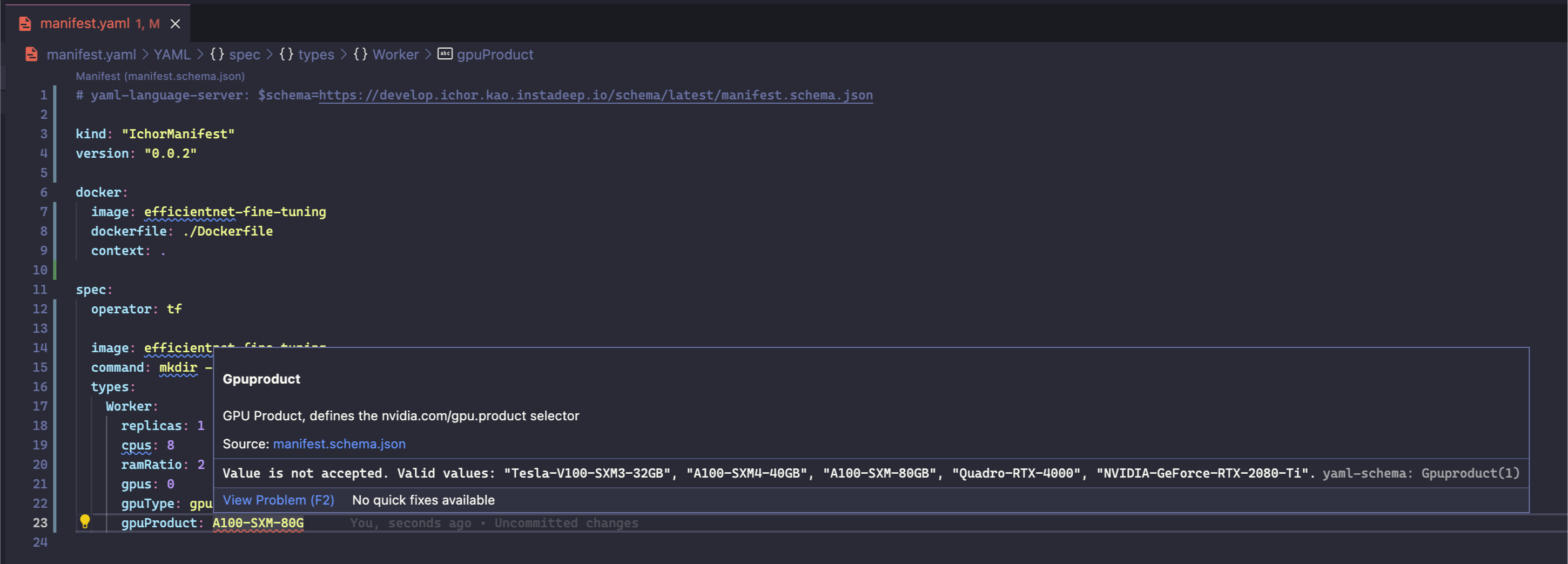
You can see the raw JSON schema here (best opened in Firefox or an IDE): https://instadeep.aichor.ai/schema/latest/manifest.schema.json
- IDE setup
-
VSCode
-
Install the YAML extension
-
Add at the top of your manifest.yaml file
# yaml-language-server: $schema=https://instadeep.aichor.ai/schema/latest/manifest.schema.json
Alternatively, you can automatically assign this schema url to any file named
manifest.yamlin your workspace or global settings.
-
-
VS Code
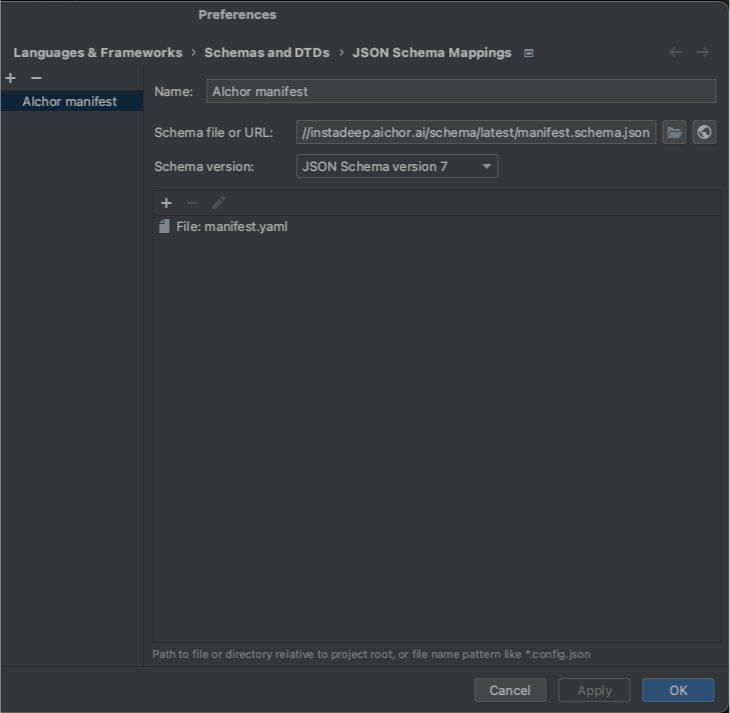
- For PyCharm users, you can assign a schema in the bottom right of the screen when editing a YAML file and fill in the pop-up window as shown below.
-
-
Writing the manifest
Hitting
ctrl+spacewill pop-up suggestions to fill fields, with sometimes descriptions on VS Code.